 Thales Maciel
3f8293ad24
Thales Maciel
3f8293ad24
Let agents inhabit a workspace across separate calls instead of only submitting one-shot execs. Add workspace shell open/read/write/signal/close across the CLI, Python SDK, and MCP server, with persisted shell records, a local PTY-backed mock implementation, and guest-agent support for real Firecracker workspaces. Mark the 2.5.0 roadmap milestone done, refresh docs/examples and the release metadata, and verify with uv lock, UV_CACHE_DIR=.uv-cache make check, and UV_CACHE_DIR=.uv-cache make dist-check. |
||
|---|---|---|
| docs | ||
| examples | ||
| runtime_sources | ||
| scripts | ||
| src/pyro_mcp | ||
| tests | ||
| .gitattributes | ||
| .gitignore | ||
| .pre-commit-config.yaml | ||
| .python-version | ||
| AGENTS.md | ||
| CHANGELOG.md | ||
| LICENSE | ||
| Makefile | ||
| pyproject.toml | ||
| README.md | ||
| TASKS.tmp.md | ||
| uv.lock | ||
pyro-mcp
pyro-mcp runs one-shot commands and repeated workspaces inside ephemeral Firecracker microVMs using curated Linux environments such as debian:12.

This is for coding agents, MCP clients, and developers who want isolated command execution in ephemeral microVMs.
It exposes the same runtime in three public forms:
- the
pyroCLI - the Python SDK via
from pyro_mcp import Pyro - an MCP server so LLM clients can call VM tools directly
Start Here
- Install: docs/install.md
- Vision: docs/vision.md
- Workspace roadmap: docs/roadmap/task-workspace-ga.md
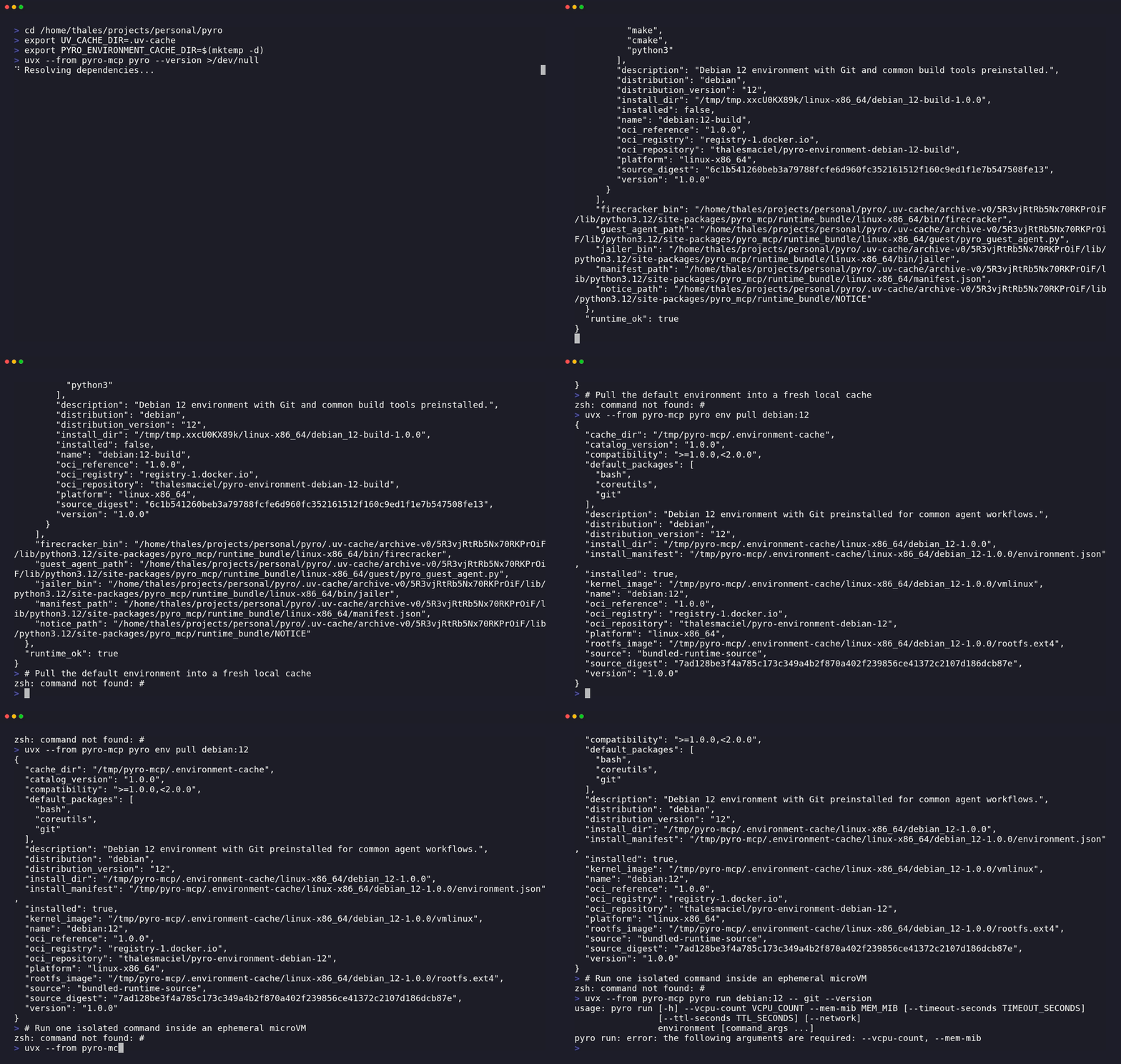
- First run transcript: docs/first-run.md
- Terminal walkthrough GIF: docs/assets/first-run.gif
- PyPI package: pypi.org/project/pyro-mcp
- What's new in 2.5.0: CHANGELOG.md#250
- Host requirements: docs/host-requirements.md
- Integration targets: docs/integrations.md
- Public contract: docs/public-contract.md
- Troubleshooting: docs/troubleshooting.md
- Changelog: CHANGELOG.md

Quickstart
Use either of these equivalent quickstart paths:
# Package without install
python -m pip install uv
uvx --from pyro-mcp pyro doctor
uvx --from pyro-mcp pyro env list
uvx --from pyro-mcp pyro env pull debian:12
uvx --from pyro-mcp pyro run debian:12 -- git --version
# Already installed
pyro doctor
pyro env list
pyro env pull debian:12
pyro run debian:12 -- git --version
From a repo checkout, replace pyro with uv run pyro.
What success looks like:
Platform: linux-x86_64
Runtime: PASS
Catalog version: 2.5.0
...
[pull] phase=install environment=debian:12
[pull] phase=ready environment=debian:12
Pulled: debian:12
...
[run] phase=create environment=debian:12
[run] phase=start vm_id=...
[run] phase=execute vm_id=...
[run] environment=debian:12 execution_mode=guest_vsock exit_code=0 duration_ms=...
git version ...
The first pull downloads an OCI environment from public Docker Hub, requires outbound HTTPS
access to registry-1.docker.io, and needs local cache space for the guest image.
After the quickstart works:
- prove the full one-shot lifecycle with
uvx --from pyro-mcp pyro demo - create a persistent workspace with
uvx --from pyro-mcp pyro workspace create debian:12 --seed-path ./repo - update a live workspace from the host with
uvx --from pyro-mcp pyro workspace sync push WORKSPACE_ID ./changes - open a persistent interactive shell with
uvx --from pyro-mcp pyro workspace shell open WORKSPACE_ID - move to Python or MCP via docs/integrations.md
Supported Hosts
Supported today:
- Linux x86_64
- Python 3.12+
uv/dev/kvm
Optional for outbound guest networking:
ipnftoriptables- privilege to create TAP devices and configure NAT
Not supported today:
- macOS
- Windows
- Linux hosts without working KVM at
/dev/kvm
Detailed Walkthrough
If you want the expanded version of the canonical quickstart, use the step-by-step flow below.
1. Check the host
uvx --from pyro-mcp pyro doctor
Expected success signals:
Platform: linux-x86_64
Runtime: PASS
KVM: exists=yes readable=yes writable=yes
Environment cache: /home/you/.cache/pyro-mcp/environments
Capabilities: vm_boot=yes guest_exec=yes guest_network=yes
Networking: tun=yes ip_forward=yes
2. Inspect the catalog
uvx --from pyro-mcp pyro env list
Expected output:
Catalog version: 2.5.0
debian:12 [installed|not installed] Debian 12 environment with Git preinstalled for common agent workflows.
debian:12-base [installed|not installed] Minimal Debian 12 environment for shell and core Unix tooling.
debian:12-build [installed|not installed] Debian 12 environment with Git and common build tools preinstalled.
3. Pull the default environment
uvx --from pyro-mcp pyro env pull debian:12
The first pull downloads an OCI environment from public Docker Hub, requires outbound HTTPS
access to registry-1.docker.io, and needs local cache space for the guest image.
See docs/host-requirements.md for the full host requirements.
4. Run one command in a guest
uvx --from pyro-mcp pyro run debian:12 -- git --version
Expected success signals:
[run] environment=debian:12 execution_mode=guest_vsock exit_code=0 duration_ms=...
git version ...
The guest command output and the [run] ... summary are written to different streams, so they
may appear in either order in terminals or capture tools. Use --json if you need a
deterministic structured result.
5. Optional demos
uvx --from pyro-mcp pyro demo
uvx --from pyro-mcp pyro demo --network
pyro demo proves the one-shot create/start/exec/delete VM lifecycle works end to end.
Example output:
{
  "cleanup": {
    "deleted": true,
    "reason": "post_exec_cleanup",
    "vm_id": "..."
  },
  "command": "git --version",
  "environment": "debian:12",
  "execution_mode": "guest_vsock",
  "exit_code": 0,
  "stdout": "git version ...\n"
}
When you are done evaluating and want to remove stale cached environments, run pyro env prune.
If you prefer a fuller copy-pasteable transcript, see docs/first-run.md. The walkthrough GIF above was rendered from docs/assets/first-run.tape using scripts/render_tape.sh.
Persistent Workspaces
Use pyro run for one-shot commands. Use pyro workspace ... when you need repeated commands in one
workspace without recreating the sandbox every time.
The project direction is an agent workspace, not a CI job runner. Persistent workspaces are meant to let an agent stay inside one bounded sandbox across multiple steps. See docs/vision.md for the product thesis and the longer-term interaction model.
pyro workspace create debian:12 --seed-path ./repo
pyro workspace sync push WORKSPACE_ID ./changes --dest src
pyro workspace exec WORKSPACE_ID -- cat src/note.txt
pyro workspace shell open WORKSPACE_ID
pyro workspace shell write WORKSPACE_ID SHELL_ID --input 'pwd'
pyro workspace shell read WORKSPACE_ID SHELL_ID
pyro workspace shell close WORKSPACE_ID SHELL_ID
pyro workspace logs WORKSPACE_ID
pyro workspace delete WORKSPACE_ID
Persistent workspaces start in /workspace and keep command history until you delete them. For
machine consumption, add --json and read the returned workspace_id. Use --seed-path when
you want the workspace to start from a host directory or a local .tar / .tar.gz / .tgz
archive instead of an empty workspace. Use pyro workspace sync push when you want to import
later host-side changes into a started workspace. Sync is non-atomic in 2.5.0; if it fails
partway through, delete and recreate the workspace from its seed. Use pyro workspace exec for
one-shot non-interactive commands inside a live workspace, and pyro workspace shell * when you
need a persistent PTY session that keeps interactive shell state between calls.
Public Interfaces
The public user-facing interface is pyro and Pyro. After the CLI validation path works, you can choose one of three surfaces:
pyrofor direct CLI usage, including one-shotrunand persistentworkspaceworkflowsfrom pyro_mcp import Pyrofor Python orchestrationpyro mcp servefor MCP clients
Command forms:
- published package without install:
uvx --from pyro-mcp pyro ... - installed package:
pyro ... - source checkout:
uv run pyro ...
Makefile targets are contributor conveniences for this repository and are not the primary product UX.
Official Environments
Current official environments in the shipped catalog:
debian:12debian:12-basedebian:12-build
The package ships the embedded Firecracker runtime and a package-controlled environment catalog.
Official environments are pulled as OCI artifacts from public Docker Hub repositories into a local
cache on first use or through pyro env pull.
End users do not need registry credentials to pull or run official environments.
The default cache location is ~/.cache/pyro-mcp/environments; override it with
PYRO_ENVIRONMENT_CACHE_DIR.
CLI
List available environments:
pyro env list
Prefetch one environment:
pyro env pull debian:12
Run one command in an ephemeral VM:
pyro run debian:12 -- git --version
Run with outbound internet enabled:
pyro run debian:12 --network -- \
  'python3 -c "import urllib.request; print(urllib.request.urlopen(\"https://example.com\", timeout=10).status)"'
Show runtime and host diagnostics:
pyro doctor
pyro doctor --json
pyro run defaults to 1 vCPU / 1024 MiB.
It fails closed when guest boot or guest exec is unavailable.
Use --allow-host-compat only if you explicitly want host execution.
Run the MCP server after the CLI path above works:
pyro mcp serve
Run the deterministic demo:
pyro demo
pyro demo --network
Run the Ollama demo:
ollama serve
ollama pull llama3.2:3b
pyro demo ollama
Python SDK
from pyro_mcp import Pyro

pyro = Pyro()
result = pyro.run_in_vm(
    environment="debian:12",
    command="git --version",
    timeout_seconds=30,
    network=False,
)
print(result["stdout"])
Lower-level lifecycle control remains available:
from pyro_mcp import Pyro

pyro = Pyro()
created = pyro.create_vm(
    environment="debian:12",
    ttl_seconds=600,
    network=True,
)
vm_id = created["vm_id"]
pyro.start_vm(vm_id)
result = pyro.exec_vm(vm_id, command="git --version", timeout_seconds=30)
print(result["stdout"])
exec_vm() is a one-command auto-cleaning call. After it returns, the VM is already deleted.
Environment management is also available through the SDK:
from pyro_mcp import Pyro

pyro = Pyro()
print(pyro.list_environments())
print(pyro.inspect_environment("debian:12"))
For repeated commands in one workspace:
from pyro_mcp import Pyro

pyro = Pyro()
workspace = pyro.create_workspace(environment="debian:12", seed_path="./repo")
workspace_id = workspace["workspace_id"]
try:
    pyro.push_workspace_sync(workspace_id, "./changes", dest="src")
    result = pyro.exec_workspace(workspace_id, command="cat src/note.txt")
    print(result["stdout"], end="")
finally:
    pyro.delete_workspace(workspace_id)
MCP Tools
Primary agent-facing tool:
vm_run(environment, command, vcpu_count=1, mem_mib=1024, timeout_seconds=30, ttl_seconds=600, network=false, allow_host_compat=false)
Advanced lifecycle tools:
vm_list_environments()vm_create(environment, vcpu_count=1, mem_mib=1024, ttl_seconds=600, network=false, allow_host_compat=false)vm_start(vm_id)vm_exec(vm_id, command, timeout_seconds=30)auto-cleans the VM after that commandvm_stop(vm_id)vm_delete(vm_id)vm_status(vm_id)vm_network_info(vm_id)vm_reap_expired()
Persistent workspace tools:
workspace_create(environment, vcpu_count=1, mem_mib=1024, ttl_seconds=600, network=false, allow_host_compat=false, seed_path=null)workspace_sync_push(workspace_id, source_path, dest="/workspace")workspace_exec(workspace_id, command, timeout_seconds=30)workspace_status(workspace_id)workspace_logs(workspace_id)workspace_delete(workspace_id)
Integration Examples
- Python one-shot SDK example: examples/python_run.py
- Python lifecycle example: examples/python_lifecycle.py
- Python workspace example: examples/python_workspace.py
- MCP client config example: examples/mcp_client_config.md
- Claude Desktop MCP config: examples/claude_desktop_mcp_config.json
- Cursor MCP config: examples/cursor_mcp_config.json
- OpenAI Responses API example: examples/openai_responses_vm_run.py
- LangChain wrapper example: examples/langchain_vm_run.py
- Agent-ready
vm_runexample: examples/agent_vm_run.py
Runtime
The package ships an embedded Linux x86_64 runtime payload with:
- Firecracker
- Jailer
- guest agent
- runtime manifest and diagnostics
No system Firecracker installation is required.
pyro installs curated environments into a local cache and reports their status through pyro env inspect and pyro doctor.
The public CLI is human-readable by default; add --json for structured output.
Contributor Workflow
For work inside this repository:
make help
make setup
make check
make dist-check
Contributor runtime sources live under runtime_sources/. The packaged runtime bundle under
src/pyro_mcp/runtime_bundle/ contains the embedded boot/runtime assets plus manifest metadata;
end-user environment installs pull OCI-published environments by default. Use
PYRO_RUNTIME_BUNDLE_DIR=build/runtime_bundle only when you are explicitly validating a locally
built contributor runtime bundle.
Official environment publication is performed locally against Docker Hub:
export DOCKERHUB_USERNAME='your-dockerhub-username'
export DOCKERHUB_TOKEN='your-dockerhub-token'
make runtime-materialize
make runtime-publish-official-environments-oci
make runtime-publish-environment-oci auto-exports the OCI layout for the selected
environment if it is missing.
The publisher accepts either DOCKERHUB_USERNAME and DOCKERHUB_TOKEN or
OCI_REGISTRY_USERNAME and OCI_REGISTRY_PASSWORD.
Docker Hub uploads are chunked by default for large rootfs layers; if you need to tune a slow
link, use PYRO_OCI_UPLOAD_TIMEOUT_SECONDS, PYRO_OCI_UPLOAD_CHUNK_SIZE_BYTES, and
PYRO_OCI_REQUEST_TIMEOUT_SECONDS.
For a local PyPI publish:
export TWINE_PASSWORD='pypi-...'
make pypi-publish
make pypi-publish defaults TWINE_USERNAME to __token__.
Set PYPI_REPOSITORY_URL=https://test.pypi.org/legacy/ to publish to TestPyPI instead.