 Thales Maciel
dccc2152e3
Thales Maciel
dccc2152e3
Clarify that pyro should evolve into a disposable workspace for agents instead of drifting into a secure CI or task-runner identity. Add a dedicated vision doc that captures the product thesis, anti-goals, naming guidance, and the future interaction model around workspaces, shells, services, snapshots, and reset. Link that doc from the README landing path and persistent task section so the distinction is visible to new users. Keep the proposed workspace and shell primitives explicitly illustrative so the vision sharpens direction without silently changing the current public contract. |
||
|---|---|---|
| docs | ||
| examples | ||
| runtime_sources | ||
| scripts | ||
| src/pyro_mcp | ||
| tests | ||
| .gitattributes | ||
| .gitignore | ||
| .pre-commit-config.yaml | ||
| .python-version | ||
| AGENTS.md | ||
| CHANGELOG.md | ||
| LICENSE | ||
| Makefile | ||
| pyproject.toml | ||
| README.md | ||
| TASKS.tmp.md | ||
| uv.lock | ||
pyro-mcp
pyro-mcp runs one-shot commands and repeated task workspaces inside ephemeral Firecracker microVMs using curated Linux environments such as debian:12.

This is for coding agents, MCP clients, and developers who want isolated command execution in ephemeral microVMs.
It exposes the same runtime in three public forms:
- the
pyroCLI - the Python SDK via
from pyro_mcp import Pyro - an MCP server so LLM clients can call VM tools directly
Start Here
- Install: docs/install.md
- Vision: docs/vision.md
- First run transcript: docs/first-run.md
- Terminal walkthrough GIF: docs/assets/first-run.gif
- PyPI package: pypi.org/project/pyro-mcp
- What's new in 2.3.0: CHANGELOG.md#230
- Host requirements: docs/host-requirements.md
- Integration targets: docs/integrations.md
- Public contract: docs/public-contract.md
- Troubleshooting: docs/troubleshooting.md
- Changelog: CHANGELOG.md

Quickstart
Use either of these equivalent quickstart paths:
# Package without install
python -m pip install uv
uvx --from pyro-mcp pyro doctor
uvx --from pyro-mcp pyro env list
uvx --from pyro-mcp pyro env pull debian:12
uvx --from pyro-mcp pyro run debian:12 -- git --version
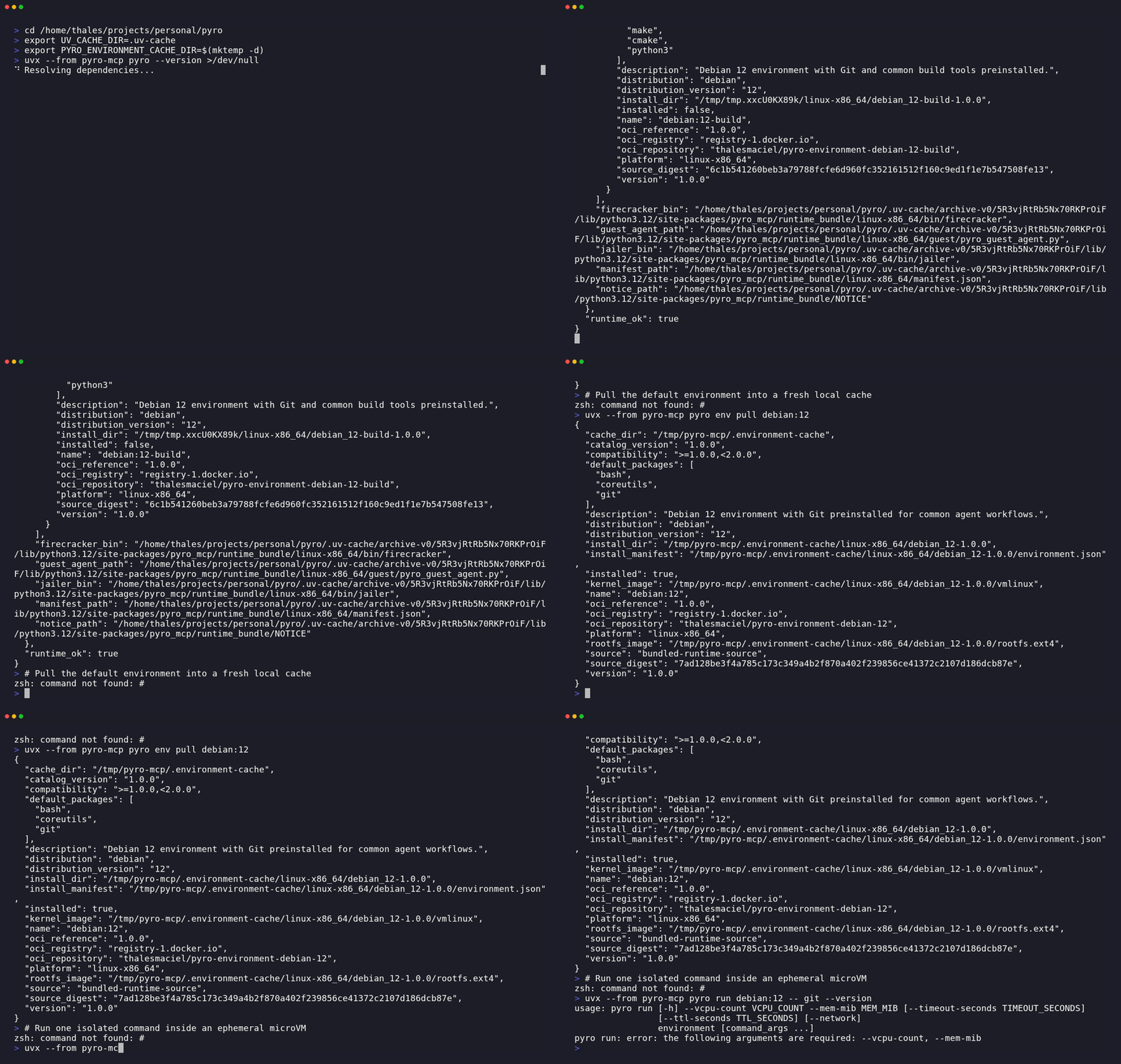
# Already installed
pyro doctor
pyro env list
pyro env pull debian:12
pyro run debian:12 -- git --version
From a repo checkout, replace pyro with uv run pyro.
What success looks like:
Platform: linux-x86_64
Runtime: PASS
Catalog version: 2.3.0
...
[pull] phase=install environment=debian:12
[pull] phase=ready environment=debian:12
Pulled: debian:12
...
[run] phase=create environment=debian:12
[run] phase=start vm_id=...
[run] phase=execute vm_id=...
[run] environment=debian:12 execution_mode=guest_vsock exit_code=0 duration_ms=...
git version ...
The first pull downloads an OCI environment from public Docker Hub, requires outbound HTTPS
access to registry-1.docker.io, and needs local cache space for the guest image.
After the quickstart works:
- prove the full one-shot lifecycle with
uvx --from pyro-mcp pyro demo - create a persistent workspace with
uvx --from pyro-mcp pyro task create debian:12 --source-path ./repo - update a live task from the host with
uvx --from pyro-mcp pyro task sync push TASK_ID ./changes - move to Python or MCP via docs/integrations.md
Supported Hosts
Supported today:
- Linux x86_64
- Python 3.12+
uv/dev/kvm
Optional for outbound guest networking:
ipnftoriptables- privilege to create TAP devices and configure NAT
Not supported today:
- macOS
- Windows
- Linux hosts without working KVM at
/dev/kvm
Detailed Walkthrough
If you want the expanded version of the canonical quickstart, use the step-by-step flow below.
1. Check the host
uvx --from pyro-mcp pyro doctor
Expected success signals:
Platform: linux-x86_64
Runtime: PASS
KVM: exists=yes readable=yes writable=yes
Environment cache: /home/you/.cache/pyro-mcp/environments
Capabilities: vm_boot=yes guest_exec=yes guest_network=yes
Networking: tun=yes ip_forward=yes
2. Inspect the catalog
uvx --from pyro-mcp pyro env list
Expected output:
Catalog version: 2.2.0
debian:12 [installed|not installed] Debian 12 environment with Git preinstalled for common agent workflows.
debian:12-base [installed|not installed] Minimal Debian 12 environment for shell and core Unix tooling.
debian:12-build [installed|not installed] Debian 12 environment with Git and common build tools preinstalled.
3. Pull the default environment
uvx --from pyro-mcp pyro env pull debian:12
The first pull downloads an OCI environment from public Docker Hub, requires outbound HTTPS
access to registry-1.docker.io, and needs local cache space for the guest image.
See docs/host-requirements.md for the full host requirements.
4. Run one command in a guest
uvx --from pyro-mcp pyro run debian:12 -- git --version
Expected success signals:
[run] environment=debian:12 execution_mode=guest_vsock exit_code=0 duration_ms=...
git version ...
The guest command output and the [run] ... summary are written to different streams, so they
may appear in either order in terminals or capture tools. Use --json if you need a
deterministic structured result.
5. Optional demos
uvx --from pyro-mcp pyro demo
uvx --from pyro-mcp pyro demo --network
pyro demo proves the one-shot create/start/exec/delete VM lifecycle works end to end.
Example output:
{
  "cleanup": {
    "deleted": true,
    "reason": "post_exec_cleanup",
    "vm_id": "..."
  },
  "command": "git --version",
  "environment": "debian:12",
  "execution_mode": "guest_vsock",
  "exit_code": 0,
  "stdout": "git version ...\n"
}
When you are done evaluating and want to remove stale cached environments, run pyro env prune.
If you prefer a fuller copy-pasteable transcript, see docs/first-run.md. The walkthrough GIF above was rendered from docs/assets/first-run.tape using scripts/render_tape.sh.
Persistent Tasks
Use pyro run for one-shot commands. Use pyro task ... when you need repeated commands in one
workspace without recreating the sandbox every time.
The project direction is an agent workspace, not a CI job runner. Persistent tasks are meant to let an agent stay inside one bounded sandbox across multiple steps. See docs/vision.md for the product thesis and the longer-term interaction model.
pyro task create debian:12 --source-path ./repo
pyro task sync push TASK_ID ./changes --dest src
pyro task exec TASK_ID -- cat src/note.txt
pyro task logs TASK_ID
pyro task delete TASK_ID
Task workspaces start in /workspace and keep command history until you delete them. For machine
consumption, add --json and read the returned task_id. Use --source-path when you want the
task to start from a host directory or a local .tar / .tar.gz / .tgz archive instead of an
empty workspace. Use pyro task sync push when you want to import later host-side changes into a
started task. Sync is non-atomic in 2.3.0; if it fails partway through, delete and recreate the
task from its seed.
Public Interfaces
The public user-facing interface is pyro and Pyro. After the CLI validation path works, you can choose one of three surfaces:
pyrofor direct CLI usage, including one-shotrunand persistenttaskworkflowsfrom pyro_mcp import Pyrofor Python orchestrationpyro mcp servefor MCP clients
Command forms:
- published package without install:
uvx --from pyro-mcp pyro ... - installed package:
pyro ... - source checkout:
uv run pyro ...
Makefile targets are contributor conveniences for this repository and are not the primary product UX.
Official Environments
Current official environments in the shipped catalog:
debian:12debian:12-basedebian:12-build
The package ships the embedded Firecracker runtime and a package-controlled environment catalog.
Official environments are pulled as OCI artifacts from public Docker Hub repositories into a local
cache on first use or through pyro env pull.
End users do not need registry credentials to pull or run official environments.
The default cache location is ~/.cache/pyro-mcp/environments; override it with
PYRO_ENVIRONMENT_CACHE_DIR.
CLI
List available environments:
pyro env list
Prefetch one environment:
pyro env pull debian:12
Run one command in an ephemeral VM:
pyro run debian:12 -- git --version
Run with outbound internet enabled:
pyro run debian:12 --network -- \
  'python3 -c "import urllib.request; print(urllib.request.urlopen(\"https://example.com\", timeout=10).status)"'
Show runtime and host diagnostics:
pyro doctor
pyro doctor --json
pyro run defaults to 1 vCPU / 1024 MiB.
It fails closed when guest boot or guest exec is unavailable.
Use --allow-host-compat only if you explicitly want host execution.
Run the MCP server after the CLI path above works:
pyro mcp serve
Run the deterministic demo:
pyro demo
pyro demo --network
Run the Ollama demo:
ollama serve
ollama pull llama3.2:3b
pyro demo ollama
Python SDK
from pyro_mcp import Pyro

pyro = Pyro()
result = pyro.run_in_vm(
    environment="debian:12",
    command="git --version",
    timeout_seconds=30,
    network=False,
)
print(result["stdout"])
Lower-level lifecycle control remains available:
from pyro_mcp import Pyro

pyro = Pyro()
created = pyro.create_vm(
    environment="debian:12",
    ttl_seconds=600,
    network=True,
)
vm_id = created["vm_id"]
pyro.start_vm(vm_id)
result = pyro.exec_vm(vm_id, command="git --version", timeout_seconds=30)
print(result["stdout"])
exec_vm() is a one-command auto-cleaning call. After it returns, the VM is already deleted.
Environment management is also available through the SDK:
from pyro_mcp import Pyro

pyro = Pyro()
print(pyro.list_environments())
print(pyro.inspect_environment("debian:12"))
For repeated commands in one workspace:
from pyro_mcp import Pyro

pyro = Pyro()
task = pyro.create_task(environment="debian:12", source_path="./repo")
task_id = task["task_id"]
try:
    pyro.push_task_sync(task_id, "./changes", dest="src")
    result = pyro.exec_task(task_id, command="cat src/note.txt")
    print(result["stdout"], end="")
finally:
    pyro.delete_task(task_id)
MCP Tools
Primary agent-facing tool:
vm_run(environment, command, vcpu_count=1, mem_mib=1024, timeout_seconds=30, ttl_seconds=600, network=false, allow_host_compat=false)
Advanced lifecycle tools:
vm_list_environments()vm_create(environment, vcpu_count=1, mem_mib=1024, ttl_seconds=600, network=false, allow_host_compat=false)vm_start(vm_id)vm_exec(vm_id, command, timeout_seconds=30)auto-cleans the VM after that commandvm_stop(vm_id)vm_delete(vm_id)vm_status(vm_id)vm_network_info(vm_id)vm_reap_expired()
Persistent workspace tools:
task_create(environment, vcpu_count=1, mem_mib=1024, ttl_seconds=600, network=false, allow_host_compat=false, source_path=null)task_sync_push(task_id, source_path, dest="/workspace")task_exec(task_id, command, timeout_seconds=30)task_status(task_id)task_logs(task_id)task_delete(task_id)
Integration Examples
- Python one-shot SDK example: examples/python_run.py
- Python lifecycle example: examples/python_lifecycle.py
- Python task workspace example: examples/python_task.py
- MCP client config example: examples/mcp_client_config.md
- Claude Desktop MCP config: examples/claude_desktop_mcp_config.json
- Cursor MCP config: examples/cursor_mcp_config.json
- OpenAI Responses API example: examples/openai_responses_vm_run.py
- LangChain wrapper example: examples/langchain_vm_run.py
- Agent-ready
vm_runexample: examples/agent_vm_run.py
Runtime
The package ships an embedded Linux x86_64 runtime payload with:
- Firecracker
- Jailer
- guest agent
- runtime manifest and diagnostics
No system Firecracker installation is required.
pyro installs curated environments into a local cache and reports their status through pyro env inspect and pyro doctor.
The public CLI is human-readable by default; add --json for structured output.
Contributor Workflow
For work inside this repository:
make help
make setup
make check
make dist-check
Contributor runtime sources live under runtime_sources/. The packaged runtime bundle under
src/pyro_mcp/runtime_bundle/ contains the embedded boot/runtime assets plus manifest metadata;
end-user environment installs pull OCI-published environments by default. Use
PYRO_RUNTIME_BUNDLE_DIR=build/runtime_bundle only when you are explicitly validating a locally
built contributor runtime bundle.
Official environment publication is performed locally against Docker Hub:
export DOCKERHUB_USERNAME='your-dockerhub-username'
export DOCKERHUB_TOKEN='your-dockerhub-token'
make runtime-materialize
make runtime-publish-official-environments-oci
make runtime-publish-environment-oci auto-exports the OCI layout for the selected
environment if it is missing.
The publisher accepts either DOCKERHUB_USERNAME and DOCKERHUB_TOKEN or
OCI_REGISTRY_USERNAME and OCI_REGISTRY_PASSWORD.
Docker Hub uploads are chunked by default for large rootfs layers; if you need to tune a slow
link, use PYRO_OCI_UPLOAD_TIMEOUT_SECONDS, PYRO_OCI_UPLOAD_CHUNK_SIZE_BYTES, and
PYRO_OCI_REQUEST_TIMEOUT_SECONDS.
For a local PyPI publish:
export TWINE_PASSWORD='pypi-...'
make pypi-publish
make pypi-publish defaults TWINE_USERNAME to __token__.
Set PYPI_REPOSITORY_URL=https://test.pypi.org/legacy/ to publish to TestPyPI instead.