 Thales Maciel
dc86d84e96
Thales Maciel
dc86d84e96
Add workspace summary across the CLI, SDK, and MCP, and include it in the workspace-core profile so chat hosts can review one concise view of the current session.

Persist lightweight review events for syncs, file edits, patch applies, exports, service lifecycle, and snapshot activity, then synthesize them with command history, current services, snapshot state, and current diff data since the last reset.

Update the walkthroughs, use-case docs, public contract, changelog, and roadmap for 4.3.0, and make dist-check invoke the CLI module directly so local package reinstall quirks do not break the packaging gate.

Validation: uv lock; ./.venv/bin/pytest --no-cov tests/test_vm_manager.py tests/test_cli.py tests/test_api.py tests/test_server.py tests/test_public_contract.py tests/test_workspace_use_case_smokes.py; UV_OFFLINE=1 UV_CACHE_DIR=.uv-cache make check; UV_OFFLINE=1 UV_CACHE_DIR=.uv-cache make dist-check; real guest-backed workspace create -> patch apply -> workspace summary --json -> delete smoke.
8.7 KiB
pyro-mcp
pyro-mcp is a disposable MCP workspace for chat-based coding agents such as
Claude Code, Codex, and OpenCode.
It is built for Linux x86_64 hosts with working KVM. The product path is:
- prove the host works
- connect a chat host over MCP
- let the agent work inside a disposable workspace
- validate the workflow with the recipe-backed smoke pack
pyro-mcp currently has no users. Expect breaking changes while this chat-host
path is still being shaped.
This repo is not trying to be a generic VM toolkit, a CI runner, or an SDK-first platform.

Start Here
- Install and zero-to-hero path: docs/install.md
- First run transcript: docs/first-run.md
- Chat host integrations: docs/integrations.md
- Use-case recipes: docs/use-cases/README.md
- Vision: docs/vision.md
- Public contract: docs/public-contract.md
- Host requirements: docs/host-requirements.md
- Troubleshooting: docs/troubleshooting.md
- Stable workspace walkthrough GIF: docs/assets/workspace-first-run.gif
- Terminal walkthrough GIF: docs/assets/first-run.gif
- What's new in 4.3.0: CHANGELOG.md#430
- PyPI package: pypi.org/project/pyro-mcp


Who It's For
- Claude Code users who want disposable workspaces instead of running directly on the host
- Codex users who want an MCP-backed sandbox for repo setup, bug fixing, and evaluation loops
- OpenCode users who want the same disposable workspace model
- people evaluating repo setup, test, and app-start workflows from a chat interface on a clean machine
If you want a general VM platform, a queueing system, or a broad SDK product, this repo is intentionally biased away from that story.
Quickstart
Use either of these equivalent quickstart paths:
# Package without install
python -m pip install uv
uvx --from pyro-mcp pyro doctor
uvx --from pyro-mcp pyro env list
uvx --from pyro-mcp pyro env pull debian:12
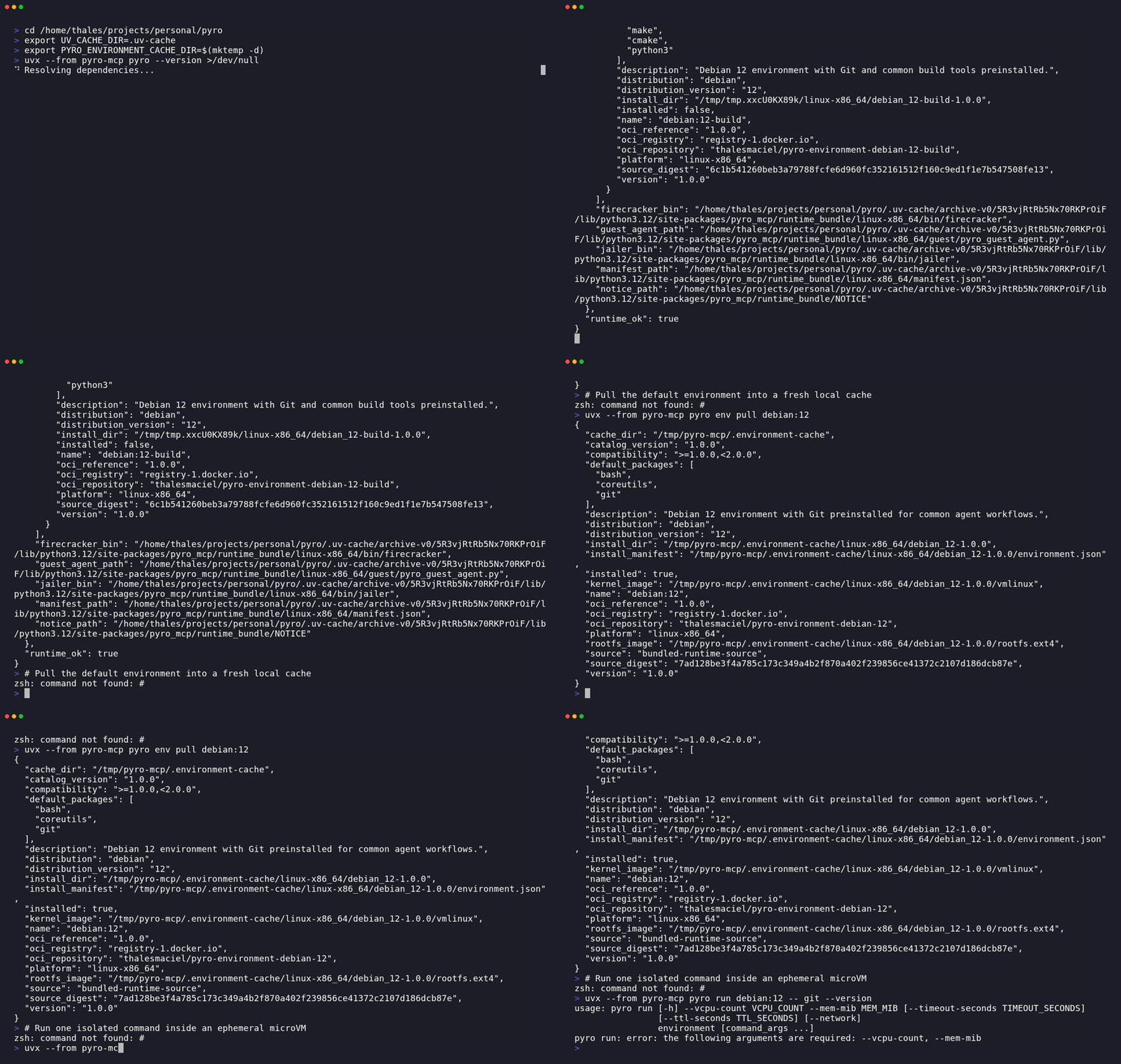
uvx --from pyro-mcp pyro run debian:12 -- git --version
# Already installed
pyro doctor
pyro env list
pyro env pull debian:12
pyro run debian:12 -- git --version
From a repo checkout, replace pyro with uv run pyro.
What success looks like:
Platform: linux-x86_64
Runtime: PASS
Catalog version: 4.3.0
...
[pull] phase=install environment=debian:12
[pull] phase=ready environment=debian:12
Pulled: debian:12
...
[run] phase=create environment=debian:12
[run] phase=start vm_id=...
[run] phase=execute vm_id=...
[run] environment=debian:12 execution_mode=guest_vsock exit_code=0 duration_ms=...
git version ...
The first pull downloads an OCI environment from public Docker Hub, requires
outbound HTTPS access to registry-1.docker.io, and needs local cache space
for the guest image.
Chat Host Quickstart
After the quickstart works, the intended next step is to connect a chat host. Use the helper flow first:
uvx --from pyro-mcp pyro host connect claude-code
uvx --from pyro-mcp pyro host connect codex
uvx --from pyro-mcp pyro host print-config opencode
If setup drifts or you want to inspect it first:
uvx --from pyro-mcp pyro host doctor
uvx --from pyro-mcp pyro host repair claude-code
uvx --from pyro-mcp pyro host repair codex
uvx --from pyro-mcp pyro host repair opencode
Those helpers wrap the same pyro mcp serve entrypoint. From a repo root,
bare pyro mcp serve starts workspace-core, auto-detects the current Git
checkout, and lets the first workspace_create omit seed_path.
uvx --from pyro-mcp pyro mcp serve
If the host does not preserve the server working directory, use:
uvx --from pyro-mcp pyro host connect codex --project-path /abs/path/to/repo
uvx --from pyro-mcp pyro mcp serve --project-path /abs/path/to/repo
If you are starting outside a local checkout, use a clean clone source:
uvx --from pyro-mcp pyro host connect codex --repo-url https://github.com/example/project.git
uvx --from pyro-mcp pyro mcp serve --repo-url https://github.com/example/project.git
Copy-paste host-specific starts:
- Claude Code: examples/claude_code_mcp.md
- Codex: examples/codex_mcp.md
- OpenCode: examples/opencode_mcp_config.json
- Generic MCP config: examples/mcp_client_config.md
Claude Code:
claude mcp add pyro -- uvx --from pyro-mcp pyro mcp serve
Codex:
codex mcp add pyro -- uvx --from pyro-mcp pyro mcp serve
OpenCode opencode.json snippet:
{
  "mcp": {
    "pyro": {
      "type": "local",
      "enabled": true,
      "command": ["uvx", "--from", "pyro-mcp", "pyro", "mcp", "serve"]
    }
  }
}
If OpenCode launches the server from an unexpected cwd, use
pyro host print-config opencode --project-path /abs/path/to/repo or add
"--project-path", "/abs/path/to/repo" after "serve" in the same command
array.
If pyro-mcp is already installed, replace uvx --from pyro-mcp pyro with
pyro in the same command or config shape.
Use --profile workspace-full only when the chat truly needs shells, services,
snapshots, secrets, network policy, or disk tools.
Zero To Hero
- Validate the host with
pyro doctor. - Pull
debian:12and prove guest execution withpyro run debian:12 -- git --version. - Connect Claude Code, Codex, or OpenCode with
pyro host connect ...orpyro host print-config opencode, then fall back to rawpyro mcp servewith--project-path/--repo-urlwhen cwd is not the source of truth. - Start with one recipe from docs/use-cases/README.md.
repro-fix-loopis the shortest chat-first story. - Use
make smoke-use-casesas the trustworthy guest-backed verification path for the advertised workflows.
That is the intended user journey. The terminal commands exist to validate and debug that chat-host path, not to replace it as the main product story.
Manual Terminal Workspace Flow
If you want to understand what the agent gets inside the sandbox, or debug a recipe outside the chat host, use the terminal companion flow below:
uv tool install pyro-mcp
WORKSPACE_ID="$(pyro workspace create debian:12 --seed-path ./repo --name repro-fix --label issue=123 --id-only)"
pyro workspace list
pyro workspace sync push "$WORKSPACE_ID" ./changes
pyro workspace file read "$WORKSPACE_ID" note.txt --content-only
pyro workspace patch apply "$WORKSPACE_ID" --patch-file fix.patch
pyro workspace exec "$WORKSPACE_ID" -- cat note.txt
pyro workspace summary "$WORKSPACE_ID"
pyro workspace snapshot create "$WORKSPACE_ID" checkpoint
pyro workspace reset "$WORKSPACE_ID" --snapshot checkpoint
pyro workspace export "$WORKSPACE_ID" note.txt --output ./note.txt
pyro workspace delete "$WORKSPACE_ID"
Add workspace-full only when the chat or your manual debugging loop really
needs:
- persistent PTY shells
- long-running services and readiness probes
- guest networking and published ports
- secrets
- stopped-workspace disk inspection
The five recipe docs show when those capabilities are justified: docs/use-cases/README.md
Official Environments
Current official environments in the shipped catalog:
debian:12debian:12-basedebian:12-build
The embedded Firecracker runtime ships with the package. Official environments
are pulled as OCI artifacts from public Docker Hub into a local cache on first
use or through pyro env pull. End users do not need registry credentials to
pull or run the official environments.
Contributor Workflow
For work inside this repository:
make help
make setup
make check
make dist-check
Contributor runtime sources live under runtime_sources/. The packaged runtime
bundle under src/pyro_mcp/runtime_bundle/ contains the embedded boot/runtime
assets plus manifest metadata. End-user environment installs pull
OCI-published environments by default. Use
PYRO_RUNTIME_BUNDLE_DIR=build/runtime_bundle only when you are explicitly
validating a locally built contributor runtime bundle.
Official environment publication is performed locally against Docker Hub:
export DOCKERHUB_USERNAME='your-dockerhub-username'
export DOCKERHUB_TOKEN='your-dockerhub-token'
make runtime-materialize
make runtime-publish-official-environments-oci
For a local PyPI publish:
export TWINE_PASSWORD='pypi-...'
make pypi-publish